


LivHub - Video Chat Online
4.4914.00 Reviews
App Specs
- Version
- 3.0.24
- Updated On
- License
- Free
- Downloads
- 10,000,000+
- Developer
- LivHub Inc
- Categories
- Social
- Platform
- Android
Screenshots



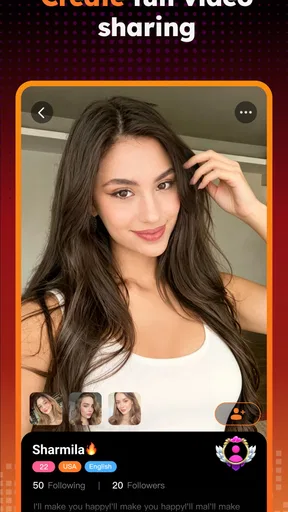

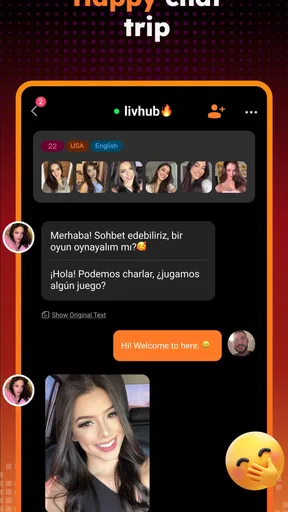
 Analysis by AppCompare
I approached LivHub - Video Chat Online as a social app for people who want conversation to feel more immediate than typing. Its basic idea is easy to understand: connect with friends through video rather than relying only on messages. That sounds simple, but the real question is whether the experience remains comfortable when users have different levels of confidence, attention, hearing, vision, movement, privacy, or internet reliability. After spending time with it, I see LivHub as a straightforward option for casual video contact, with a few important boundaries that are especially relevant to mature users and anyone who needs a calmer, more predictable way to communicate.
The app is free to install, although it includes optional purchases ranging from $0.99 to $99.99 per item. It is published by LivHub Inc and sits in the social category rather than presenting itself as a work-focused meeting tool. That distinction matters. I would reach for it when I want a relaxed conversation with friends, not when I need formal scheduling, presentation controls, transcripts, or the structured controls associated with professional conferencing services.
How LivHub feels to read and navigate
My first impression was that LivHub does not ask the user to learn a complicated system before reaching the central purpose. The product is built around video chat, so the mental model is familiar: find the person or social connection you want, begin a conversation, and stay focused on the live exchange. That directness is useful for people who find large social platforms tiring, especially when an app hides its main action beneath several layers of feeds, recommendations, and unrelated tools.
For someone with limited experience using video chat, the clearest workflow is to begin with one trusted friend rather than trying to explore every social possibility at once. I recommend checking the account and conversation controls before making a call, then using a short first session to learn where the mute, camera, and end-call actions appear. This small preparation reduces the pressure of searching for an essential control while another person is already waiting.
Readability is not only about font size. It also involves whether labels are understandable, whether buttons are placed consistently, and whether the screen stays visually calm while a conversation is happening. LivHub benefits from having one dominant purpose, but video interfaces can still become confusing when the image, controls, notifications, and social prompts compete for attention. I found it easier to use when I treated the call screen as a conversation space rather than trying to manage other tasks at the same time.
That approach is particularly helpful for older users or anyone who becomes disoriented by changing layouts. I would set up the app alongside the person who will use it, make sure they recognize the contact they intend to call, and practice ending a call before the first important conversation. A short rehearsal is more useful than explaining every possible function in advance. It also gives the user a chance to decide whether the visual arrangement feels comfortable.
LivHub runs on Android devices using Android 6.0 or later. That broad compatibility can be helpful for people who keep an older phone instead of replacing it frequently. At the same time, compatibility does not guarantee an equally pleasant experience on every device. Older hardware may have a smaller screen, a weaker camera, slower performance, or less reliable battery life. If the image feels cramped or the controls are difficult to distinguish, the limitation may come from the phone rather than the service itself.
Worth Reading Before You Choose

EA SPORTS FC Mobile 26 Is a Bigger Football Game, but It Takes Time

Flipboard Shows What News Apps Must Do Beyond the Feed

Switching to Android Auto Means Rethinking Your Driving Routine

Google Calendar Makes a Crowded Week Easier to Manage

Ludo King Makes the Most of the Minutes Between Plans

Baby Panda World Brings Quick Play to Modern Phones, but Its Game Library Feels Busy
The current version is 3.0.24, so I would keep the app updated through the normal store process when possible. Updates can affect layout and behavior, which means a person who depends on a familiar routine may appreciate checking the interface after an update rather than assuming every control remains in exactly the same place. This is a good habit for family members helping someone who prefers consistency.
Practical navigation habits that make a difference
I found three habits more valuable than simply telling someone that the app is easy. First, create a small list of people the user actually wants to contact instead of treating the service as an open-ended social space. A shorter contact path reduces mistaken calls and makes the app feel less demanding. Second, use a quiet setup area with the phone positioned before starting the conversation. This avoids adjusting the device repeatedly once the call begins. Third, agree on a simple backup plan, such as switching to ordinary messaging or a regular phone call if video becomes tiring or unstable.
These steps are not glamorous, but they address the everyday friction that often determines whether a social app gets used again. A person may enjoy video chat in theory and still abandon it if every session begins with uncertainty about who to contact, where to place the phone, or how to leave the call.
Motor, sensory, and communication considerations
Video chat places demands on the body that text chat does not. The user may need to hold or position a phone, look at a moving image, listen continuously, react quickly, and manage on-screen controls. For someone with reduced hand strength or limited fine-motor control, repeated tapping on small controls can be tiring. A stable stand or a carefully chosen resting position can make the experience much easier than holding the device throughout a long conversation.
I would not judge LivHub only by whether a person can start a call. The more useful test is whether they can comfortably manage the whole exchange: mute themselves, respond when needed, reposition the phone, and end the session without assistance. If those actions are difficult, a friend or family member can prepare the device first, but the user should still know how to stop the conversation. Having an independent way to end a call is an important part of feeling safe and in control.
For users with hearing difficulties, video can help because facial expression and visible reactions provide extra context. It may be easier to follow a familiar person when their face is visible than when communication happens through voice alone. However, video is not a substitute for captions or a transcript. If a user depends on written support to understand speech, I would test LivHub with a trusted contact before relying on it for important information. The app is best treated as a visual conversation tool, not as a guaranteed solution for every hearing need.
Lighting and camera position also affect comprehension. A face that is too dark, too far away, or constantly moving becomes harder to read, particularly for someone who depends on lip movement or facial cues. I recommend placing the phone at eye level, facing a steady light source, and avoiding a bright window behind the speaker. These changes cost nothing and can improve the conversation more than repeatedly increasing volume.
Users with visual impairments may encounter a different set of challenges. A video-first interface can make it harder to understand what is happening if the important information is communicated mainly through images, icons, or changes on screen. A familiar contact can reduce that burden because the user already knows the person’s voice and conversational style. Still, I would test navigation with the device’s own accessibility settings and confirm that the main actions can be located without relying entirely on visual recognition.
People who are sensitive to motion, bright screens, or crowded visual layouts may prefer shorter calls. The moving image is central to the experience, so LivHub may be less comfortable than text messaging for someone who becomes fatigued by sustained visual attention. A useful compromise is to use video for the greeting and early part of a conversation, then decide whether continuing in another format feels better. That keeps the social connection without treating video as an obligation.
Speech differences and anxiety deserve attention too. A live video call leaves less time to compose a response than messaging does, and some users may feel exposed when their face and voice are visible at once. I would begin with a person who is patient and already familiar with the user’s communication style. Short, predictable calls can build confidence. LivHub is not the best first choice for someone who strongly prefers asynchronous communication or needs time to edit every message before sending it.
Making a real-world call more comfortable
Consider a person who wants to check in with a relative after work but has limited energy and dislikes complicated apps. I would place the phone on a stand, choose a quiet room, and arrange the call for a time when neither person is rushing. The first conversation could last only a few minutes. If the user has difficulty hearing, the relative can speak one at a time and keep their face visible. If holding the phone is uncomfortable, the stand removes that physical demand. This is a realistic way to turn the app from a vague promise of connection into a repeatable routine.
Another useful scenario is a friend who lives alone and wants more personal contact than text messages provide, but does not want to join a large public community. LivHub may suit that person when conversations are limited to known contacts and the user is comfortable with the mature audience positioning. It is less suitable if the person is looking for moderated support groups, formal accessibility tools, or a carefully managed environment for vulnerable users.
Situational access: where the app fits and where it does not
LivHub works best when the user has a reasonably stable connection, enough battery, and a private place to talk. Those conditions sound obvious, but they shape whether video feels welcoming or stressful. A weak connection can turn a natural conversation into a sequence of freezes and repeated questions. A busy room can make privacy impossible. A low battery can create pressure to end the call early. I recommend treating these practical details as part of the setup rather than blaming the app when the environment is unsuitable.
The app can be useful for friends who are separated by distance, people who want a more personal check-in, and users who find facial interaction more engaging than written chat. Because it is a social product, it may also appeal to someone who wants casual contact without the formality of a business meeting. The average rating is 4.4 from around 122 thousand ratings, and the service has passed 10 million installs, which suggests that many people are comfortable enough with its basic purpose to keep it in circulation. Those figures indicate reach, but they do not remove the need to judge whether its style suits a particular person.
The mature 17+ rating is one of the clearest reasons to think about fit before recommending it. I would not present LivHub as a general-purpose app for children or as an automatic choice for a teenager simply because it offers video chat. Adults should discuss privacy, contact choices, and boundaries with younger users rather than assuming that a social video environment is harmless by default. The age classification also makes it more appropriate for adult friends and relatives than for family use involving children.
Compared with ordinary texting, LivHub offers immediacy and richer social cues, but it removes some of the control that text provides. A message can be read later, answered carefully, and revisited. A live call demands attention now. Compared with a regular phone call, video adds facial context but also introduces camera comfort, lighting, and appearance concerns. Compared with professional meeting apps, LivHub feels more personal and less formal, yet it is not the option I would choose for a scheduled presentation, a large organized session, or work that depends on detailed meeting controls.
The free entry point is helpful for trying the basic experience, but optional purchases deserve a deliberate approach. I would not spend money simply because a feature is presented during a moment of social excitement. First, use the free experience long enough to decide whether the call quality, navigation, and social environment fit your routine. If another person is helping with setup, agree in advance about purchases so that the user is not surprised by an in-app charge.
For users with limited data or older devices, video itself may be the main trade-off. A short call can be practical, while repeated long sessions may place more demand on the connection, battery, and attention than messaging. I would use LivHub selectively: reserve it for conversations where seeing the other person genuinely adds value, and use lighter communication when the goal is only to share a quick update.
Remaining barriers and the people who should skip it
LivHub’s biggest limitation for inclusive use is that live video is inherently less forgiving than asynchronous communication. If a person misses a sentence, needs a break, or cannot respond quickly, the conversation keeps moving. A patient friend can solve much of this, but the app cannot make every social situation comfortable. Users who need captions, detailed transcripts, strong moderation, or highly structured controls should investigate alternatives designed around those needs rather than expecting a casual video-chat service to provide them.
I would also be cautious about recommending it to someone who has difficulty recognizing contacts, feels pressured by unexpected calls, or is vulnerable to social manipulation. A simple interface can make starting a call easy, but ease of contact is not the same as safety. The user should understand who they are contacting and have a clear personal rule for ending conversations that feel uncomfortable. Someone who needs strict communication boundaries may prefer a more controlled service or a messaging tool where contact can be handled at their own pace.
There is also a difference between technical access and practical access. Android 6.0 compatibility may allow installation on an older device, but a person with a small display, poor microphone, or unreliable camera may still struggle. Likewise, a user may be able to see the screen but find the visual demands exhausting. I would test the complete experience with the actual phone, room, lighting, and contact—not just assume that installation proves suitability.
One underappreciated barrier is the emotional cost of being visible. Some people enjoy seeing a familiar face; others become self-conscious, distracted by their own image, or anxious about being judged. Texting remains the better choice for those users, and that is not a failure. LivHub should complement a person’s communication habits, not replace the format that helps them express themselves most clearly.
Finally, the app is not ideal for every group conversation. If several people are speaking at once, users with hearing, processing, or attention difficulties may lose the thread quickly. For a small, calm conversation with turn-taking, video can be helpful. For a noisy, spontaneous exchange, a more structured platform may be easier to follow.
My inclusive verdict
I see LivHub as a useful, approachable social video option for adults who want to see friends rather than exchange only text. Its focused purpose makes the first step less intimidating than a broad social network, and its free installation gives people a chance to decide whether the format works before committing money. The service has a substantial user base, but the more important question is personal: does live video improve this person’s communication, or does it add pressure?
My recommendation is strongest for a trusted one-to-one routine: a relative who wants regular visual contact, a friend who prefers faces and gestures, or an adult user who wants casual conversation without the formal atmosphere of a work meeting. I would prepare the phone, use a stable stand, improve the lighting, agree on a short first call, and keep a non-video backup available. Those simple measures address motor, sensory, and situational barriers better than enthusiasm alone.
I would steer away from it when the user needs reliable captions, extensive moderation, asynchronous control, formal meeting functions, or a child-appropriate environment. I would also skip it if video makes the person anxious or if their device and connection cannot support a comfortable call. In those cases, texting, ordinary voice calls, or a more specialized communication service may be the kinder and more effective choice.
Overall, LivHub earns a cautious recommendation from me. Its strongest inclusive quality is the possibility of direct, personal contact without a complicated social workflow; its main weakness is that live video asks a lot from the user and the surrounding situation. Used with familiar people, sensible boundaries, and a little preparation, it can make remote friendships feel warmer. It should not be treated as a universal communication solution, but for the right adult user, it is a practical way to bring a face and voice into an ordinary check-in.
Pros
- Simple interface makes it easy to start video chats quickly.
- Supports meeting new people beyond your usual social circle.
- Live video interactions feel more personal than text-based messaging.
- Useful filters can help users discover chats that match their interests.
- Available on mobile
- making conversations convenient while traveling.
Cons
- Some features may require in-app purchases or premium access.
- Chat quality can vary depending on other users’ internet connections.
- Public video chats may expose users to inappropriate behavior or content.
- You may encounter inactive
- fake
- or unresponsive profiles.
- Using video and audio continuously can drain your phone’s battery.
FAQs for LivHub - Video Chat Online
What is LivHub - Video Chat Online used for?
LivHub - Video Chat Online is designed for meeting and communicating with people through live video conversations. After opening the app, users can typically browse available profiles, start chats, and interact in a more personal way than with text-only social networks. It may be useful for casual conversations, making new connections, or joining a social community, although the people and features available can vary by region and account activity.
Is LivHub - Video Chat Online free to download and use?
The app can generally be downloaded without an upfront purchase, but free access does not necessarily mean that every feature is free. Video calls, virtual gifts, premium interactions, profile visibility, or other functions may require in-app credits, subscriptions, or separate purchases. Before spending money, check the pricing shown inside the app and review whether recurring billing, limited free credits, or additional charges apply to the features you want to use.
Does LivHub require an account, camera, and microphone permissions?
Most of the app’s communication features require users to create or sign in to an account, since profiles and conversations need to be connected to a specific user. A camera and microphone are also necessary for two-way video chats, while notification and storage permissions may be requested for related functions. You can review or revoke permissions in your device settings, but restricting essential access may prevent some features from working correctly.
Is LivHub - Video Chat Online safe for meeting strangers?
Video-chat platforms involve interaction with people you may not know, so users should protect their privacy even when the app provides reporting or blocking tools. Avoid sharing your home address, passwords, financial details, private documents, or personal contact information. Be cautious of requests for money or suspicious links, and end the conversation if someone makes you uncomfortable. Parents should also be aware that the app may not be suitable for children.
What should I check before downloading LivHub on Android or iPhone?
Before installing LivHub, check the official Google Play Store or Apple App Store listing for supported operating-system versions, developer information, recent updates, ratings, and privacy disclosures. It is also worth confirming how the app handles account data, recordings, messages, and advertising. Because video calling can consume considerable mobile data and battery power, using Wi-Fi and reviewing your device’s available storage can make the first experience smoother.


